iceAI Studio vous donne un contrôle total sur les connaissances de vos AI Agents et sur la façon dont ils dirigent les clients, favorisant ainsi des résolutions plus rapides et de meilleures expériences.
De la norme PCI-DSS à la certification SOC 2, le centre de contact ice est bâti sur un cadre de conformité qui saura satisfaire votre équipe de sécurité.
Intégrations CRM pour centres de contact : un guide complet
Kent Mao
Dernière mise à jour :
February 7, 2025
Neuf entreprises sur dix comptant plus de 10 employés utilisent un logiciel CRM.
Si votre centre de contact n’est pas intégré à un CRM, il accuse déjà un retard.
Mais qu’est-ce qu’une intégration CRM pour centre de contact ? Et comment choisir la solution idéale pour votre équipe ?
Ce guide explique ce que vous devez savoir, en commençant par une définition des CRM pour centres de contact.
Qu’est-ce qu’un CRM pour centre de contact ?
CRM signifie gestion de la relation client (Customer Relationship Management) et il s’agit de l’un des types de logiciels les plus courants aujourd’hui.
Le logiciel CRM pour centre de contact centralise toutes vos données client — incluant les noms, numéros de téléphone et demandes de service — dans une base de connaissances unique. Chaque membre de votre centre de contact peut consulter l’historique des conversations et s’assurer que les clients obtiennent ce dont ils ont besoin, rapidement et efficacement.
Vous pouvez utiliser votre CRM de centre de contact comme outil de suivi, d’organisation et de prévision. Une utilisation appropriée procure des avantages mesurables :
74 % des entreprises ont amélioré leurs taux de satisfaction client74 % des entreprises ont amélioré leur accès aux
La plupart des centres de contact utilisent des CRM pour réduire le nombre de fournisseurs sur leur liste de paie. Au lieu de travailler avec des prestataires distincts pour stocker les données client, ils peuvent connecter leur centre de contact à une source unique de vérité pour rassembler toutes les informations au même endroit.
Avantages des CRM pour centres de contact
Le logiciel CRM peut vous aider à simplifier et à automatiser des processus opérationnels fastidieux. Cela entraîne plusieurs avantages pour votre centre de contact, notamment :
Efficacité accrue : Les agents passent moins de temps à chercher des données client grâce à l’affichage contextuel des informations pertinentes.
Profits accrus : Les CRM collectent des informations sur les habitudes d’achat des clients, facilitant ainsi la vente incitative auprès des clients existants ou l’accélération du cycle de vente.
Moins de silos de connaissances : Comme les CRM regroupent les données client en un seul endroit, les agents passent moins de temps à consulter des bases de connaissances et plus de temps à résoudre les problèmes des clients.
Durées d’appel plus courtes : En intégrant des règles de routage efficaces dans votre CRM, vous dirigez automatiquement les clients vers l’agent approprié et réduisez les taux de transfert.
Meilleures expériences client : Les CRM réduisent les temps d’attente et augmentent les taux de résolution au premier contact, menant ultimement à des expériences positives qui favorisent la fidélité et la rétention.
Continuez votre lecture pour découvrir d’autres raisons pour lesquelles vous devriez mettre en place une intégration CRM pour votre centre de contact.
Fonctionnalités clés des CRM pour centres de contact
Les CRM pour centres de contact aident votre équipe à en faire plus avec moins en consolidant les bases de connaissances, en automatisant les flux de travail et en dirigeant les appelants vers les agents appropriés.
À condition d’utiliser une plateforme modernisée, vous devriez avoir accès aux fonctionnalités suivantes :
Suivi des contacts omnicanal
Les agents peuvent suivre les conversations sur plusieurs applications, canaux ou plateformes de médias sociaux.
Surveillance des points de contact
Vous pouvez facilement surveiller les appels, les messages et les autres points de contact de votre centre de contact.
Appel en un clic
Les équipes peuvent appeler leurs contacts directement depuis leur navigateur, ce qui permet d'économiser du temps et des efforts.
Expériences personnalisées
Comme tous les membres de votre équipe peuvent consulter les mêmes notes et informations, les contacts n'ont pas à se répéter pour obtenir les réponses dont ils ont besoin.
Gestion du parcours client
Vous pouvez surveiller les tickets des clients pour résoudre les problèmes rapidement (et également suivre les pistes en fonction de leur comportement à mesure qu'ils progressent dans votre entonnoir de vente).
Automatisation des flux de travail
Les CRM peuvent extraire des données de votre centre de contact et vice versa pour éliminer les tâches inutiles.
Pourquoi intégrer votre centre de contact à un CRM
L'intégration de votre centre de contact à un CRM vous aide à centraliser vos données en un seul endroit. Les membres de l'équipe bénéficient d'une vue à 360 degrés des contacts, tandis que les clients profitent d'expériences personnalisées.
Voici 8 avantages découlant de l'intégration de votre centre de contact et de votre CRM.
Réduisez le stress des agents. Une intégration CRM permet l'affichage instantané d'informations contextuelles importantes pour l'agent dès qu'une interaction survient. Cela leur évite d'avoir à les rechercher manuellement. De même, une intégration CRM peut insérer automatiquement des enregistrements d'activité, ce qui signifie que les agents n'ont pas à effectuer de saisie de données fastidieuse pour maintenir les dossiers CRM à jour. Fournir aux agents des outils qui facilitent leur travail réduit leur stress. Des agents plus heureux sont plus performants, ce qui se traduit par des clients plus satisfaits. C'est gagnant pour tout le monde. Servez les clients plus rapidement. Faire gagner du temps aux agents grâce à l'affichage instantané permet également d'en faire gagner aux clients. Plus un agent accède rapidement au contexte pertinent, plus vite le problème du client peut être résolu. Une intégration CRM améliore ultimement l'efficacité en permettant aux agents de résoudre davantage de demandes clients dans le même laps de temps. Éliminez les erreurs de numérotation. Lorsque les agents d'un centre de contact effectuent des appels sortants, le risque d'erreur de numérotation existe. Cependant, grâce à une intégration CRM, les fonctionnalités d'appel en un clic permettent aux agents de passer un appel directement depuis le CRM, garantissant qu'ils appellent la bonne personne à chaque fois. Unifiez les données des clients et des interactions. L'insertion automatique des enregistrements d'activité fournie par une intégration CRM signifie que l'historique complet des interactions des clients est facilement accessible au même endroit que toutes les autres informations client. Ces enregistrements peuvent également inclure des liens vers des enregistrements et des transcriptions, le cas échéant. Offrez un service plus personnalisé. Grâce à l'affichage instantané, les agents voient automatiquement le contexte pertinent concernant un client, ce qui permet un service plus personnalisé, valorise le client et augmente sa satisfaction. Les informations de contact de base permettent des salutations personnalisées ; l'historique des achats peut mener à des suggestions de produits ou services complémentaires ; les notes des interactions passées peuvent vous en dire plus sur les préférences du client et les sujets qui pourraient l'intéresser. Créez des tableaux de bord personnalisés. L'intégration de votre CRM à votre centre de contact vous permet de créer des tableaux de bord personnalisés dans votre CRM affichant des données importantes du centre de contact, telles que la durée moyenne de conversation, le nombre total d'interactions traitées et le délai d'attente moyen en file. Réduisez le temps de traitement après appel. Grâce à l'insertion automatique des enregistrements d'activité fournie par une intégration CRM, les agents n'ont pas à consacrer autant de temps à la saisie manuelle de données après un appel. Cela signifie qu'ils peuvent revenir plus rapidement à un état prêt pour traiter l'interaction suivante dans la file d'attente. Optimisez le routage des interactions. Une intégration CRM vous permet d'appliquer des règles de routage basées sur les champs de votre CRM, ce qui signifie que chaque client atteint rapidement l'agent le mieux qualifié pour traiter l'interaction, réduisant ainsi les transferts et augmentant la probabilité de résolution dès le premier contact.
N'oubliez pas : plus vous attendez pour intégrer votre centre de contact à un CRM, plus vous tardez à profiter de ces avantages.
Examinons deux méthodes différentes pour intégrer des CRM à votre centre de contact.
Comment intégrer votre centre de contact à un CRM
Il existe deux manières principales d'intégrer votre centre de contact à un CRM : les intégrations natives et les intégrations tierces.
Les intégrations natives font référence à des connecteurs CRM préconçus qui se connectent de manière transparente sans support externe.
Les intégrations tierces utilisent des API pour connecter votre centre de contact et votre CRM en quelques clics.
Parcourons ce processus en utilisant ComputerTalk comme exemple. Notre solution de centre de contact en tant que service (CCaaS) est indépendante du fournisseur, de sorte que les utilisateurs peuvent s'intégrer à des dizaines de fournisseurs de CRM.
Pour commencer, vous pouvez :
Demandez une démo gratuite du centre de contact ice de ComputerTalk.
Communiquez avec notre équipe pour créer une intégration personnalisée.
Vous êtes maintenant prêt à utiliser votre CRM de centre de contact.
Les 5 meilleures solutions CRM pour votre centre de contact
Il existe aujourd'hui des dizaines de CRM sur le marché.
Cependant, seuls quelques-uns sont conçus pour les centres de contact modernes.
Examinons vos cinq meilleures options :
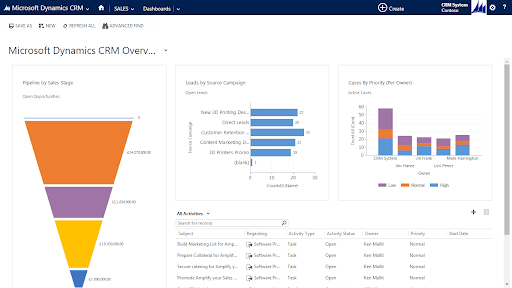
1. Microsoft Dynamics 365 : Le meilleur CRM de centre de contact pour la segmentation de la clientèle
Fonctionnalités de Microsoft Dynamics 365
Suivre les contacts par étape de vente
Prioriser les pistes et les dossiers
Surveiller toutes les activités en cours
Identifier les pistes par campagne source
Avantages de Microsoft Dynamics 365
Vous pouvez utiliser Microsoft Dynamics 365 pour obtenir des informations plus approfondies sur vos clients. En analysant les données par étape de vente et par campagne source, par exemple, vous pouvez identifier les canaux qui génèrent les pistes les plus prêtes à la conversion.
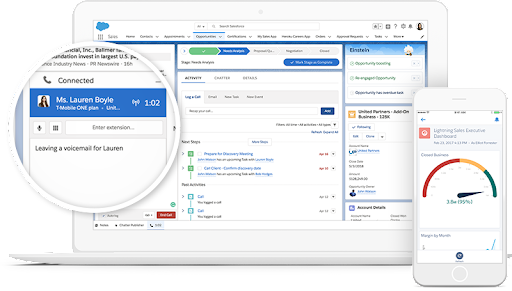
2. Salesforce : Le meilleur CRM de centre de contact pour la gestion des parcours clients
Fonctionnalités de Salesforce
Actualiser les données CRM hors ligne
Prévoir les ventes
Attribuer automatiquement les tâches
Envoyer des courriels de rappel
Avantages de Salesforce
Les outils d'intelligence prédictive de Salesforce vous aident à garder un œil sur les parcours clients. Les agents peuvent examiner les points de contact et les interactions passés pour mieux comprendre comment servir des contacts spécifiques.
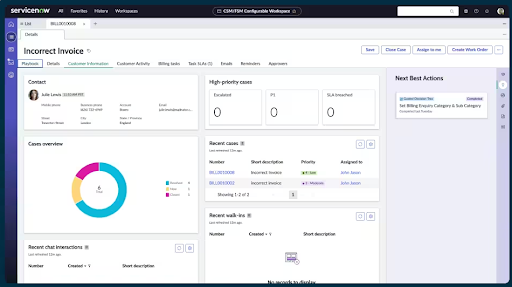
3. ServiceNow : Le meilleur CRM de centre de contact pour la gestion des tickets clients
Fonctionnalités de ServiceNow
Suivre les tickets et les dossiers
Créer un portail client en libre-service
Stocker des articles de base de connaissances
Recueillir les commentaires des clients
Avantages de ServiceNow
ServiceNow facilite la résolution des problèmes des clients et automatise le traitement des demandes de contact. Les centres de contact peuvent surveiller les tickets sur plusieurs plateformes, puis déléguer les tâches à des représentants qualifiés pour améliorer les scores de satisfaction client.
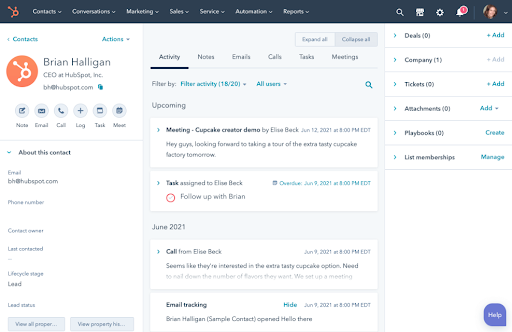
4. HubSpot : Le meilleur CRM de centre de contact pour un service omnicanal
Fonctionnalités de HubSpot
Courriels de suiviSegmenter la clientèleCréer des rapports à partir de l'analytiquePlanifier des réunions
Avantages de HubSpot
Vous pouvez utiliser HubSpot pour offrir un service omnicanal sur de multiples points de contact et plateformes. En l'intégrant à une solution CCaaS, vous pouvez connecter et surveiller les interactions avec les clients via des formulaires, les réseaux sociaux, le courriel, les appels, les messages texte, et plus encore.
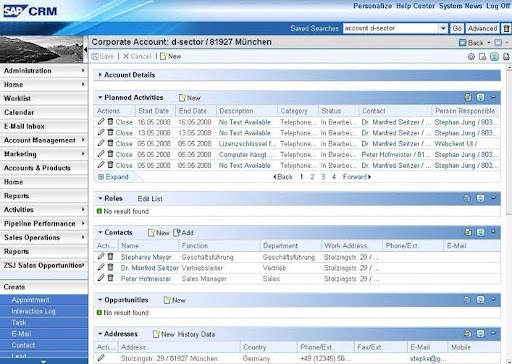
5. SAP : Le meilleur CRM de centre de contact pour les clients SAP actuels
Fonctionnalités de SAP CRM
Surveiller les activités de contact planifiéesGérer les canaux entrantsStocker les contrats clientsSuivre les commandes de produits
Avantages de SAP CRM
SAP CRM peut consolider les données clients provenant de plusieurs modules SAP. Si votre centre de contact utilise déjà le nuage SAP, vous pouvez rapidement éliminer les silos de données sans ajouter un autre fournisseur à votre infrastructure.
Résumé
Les CRM pour centres de contact sont essentiels à la croissance de votre entreprise. Ils offrent une plateforme centralisée pour accéder à toutes vos données clients et les stocker, tout en facilitant leur consultation par vos agents.
En collaborant avec un fournisseur de centre de contact pour intégrer votre CRM à votre centre de contact, vous pouvez facilement assurer le suivi des conversations et accroître l'efficacité de vos opérations.
ComputerTalk s'intègre à toutes les solutions mentionnées ci-dessus afin que vous puissiez prendre la bonne décision pour votre centre de contact. Pour en savoir plus sur nos intégrations CRM disponibles, cliquez ici.
Abonnez-vous à notre infolettre
Merci de vous être abonné!
Bienvenue dans la communauté de l'infolettre de ComputerTalk. Surveillez votre boîte de réception pour nos mises à jour mensuelles.
Oups! Une erreur est survenue lors de la soumission du formulaire.
%20-%20Google%20Ads.png)