iceAI Studio vous donne un contrôle total sur les connaissances de vos AI Agents et sur la façon dont ils dirigent les clients, favorisant ainsi des résolutions plus rapides et de meilleures expériences.
De la norme PCI-DSS à la certification SOC 2, le centre de contact ice est bâti sur un cadre de conformité qui saura satisfaire votre équipe de sécurité.
Comment générer des scripts téléphoniques RVI avec ChatGPT
Kent Mao
Dernière mise à jour :
March 6, 2025
Grâce à l'aide de ChatGPT, la rédaction de scripts de RVI n'a jamais été aussi simple.
À l'ère numérique actuelle, les systèmes de RVI sont devenus essentiels pour les entreprises. Ils permettent d'offrir une assistance automatisée aux clients sans avoir recours à un agent humain.
La création de messages de RVI clairs et efficaces est essentielle pour garantir une expérience utilisateur fluide. Toutefois, la rédaction de ces scripts peut parfois s'avérer complexe. Heureusement, grâce aux agents conversationnels IA comme ChatGPT, le processus est devenu beaucoup plus simple.
Dans ce guide étape par étape, nous vous expliquerons comment générer des exemples de scripts de RVI à l'aide de ChatGPT.
Qu'est-ce que ChatGPT?
ChatGPT est un agent conversationnel propulsé par l'IA, lancé en novembre 2022 par l'entreprise OpenAI. Il est conçu pour générer du texte semblable à celui d'un humain en fonction des données qu'il reçoit.
ChatGPT peut être utilisé pour diverses tâches de traitement du langage naturel, telles que répondre à des questions, générer du texte, participer à des conversations, et plus encore.
Il a été entraîné sur de vastes ensembles de données provenant d'Internet, ce qui lui permet de comprendre et de générer des réponses sur un large éventail de sujets. Tout le monde peut utiliser ChatGPT après avoir créé un compte gratuit sur chat.openai.com.
Comprendre les bases de la RVI
Un système téléphonique de RVI agit comme une réceptionniste numérique qui répond aux appels automatiquement. Au lieu de parler immédiatement à une personne, les appelants entendent un message enregistré et peuvent utiliser le clavier de leur téléphone pour choisir l'option souhaitée. Par exemple, ils peuvent sélectionner des options comme « Appuyez sur 1 pour les questions de facturation » ou « Appuyez sur 2 pour le soutien technique ».
Ces systèmes téléphoniques aident les entreprises à gérer efficacement un grand volume d'appels. Ils guident les appelants à travers une série d'invites pour obtenir les informations ou l'aide dont ils ont besoin sans attendre de parler à un agent en direct. Les systèmes téléphoniques de RVI sont utilisés dans de nombreux secteurs, allant des banques et des commerces de détail aux organismes gouvernementaux et aux lignes de service à la clientèle.
Dans l'ensemble, les systèmes de RVI permettent aux appelants d'obtenir rapidement l'assistance dont ils ont besoin, sans avoir à parler immédiatement à un humain. Il s'agit essentiellement d'une option libre-service pour les appels téléphoniques, ce qui facilite les choses tant pour les clients que pour les entreprises.
Lors de la conception d'un système de RVI, il est important de s'assurer que vos messages sont clairs et utiles. Continuez votre lecture pour découvrir comment y parvenir facilement à l'aide de ChatGPT.
Étape 1 : Accéder à ChatGPT
Vous pouvez accéder à ChatGPT via différentes plateformes en ligne, notamment le site Web d'OpenAI.
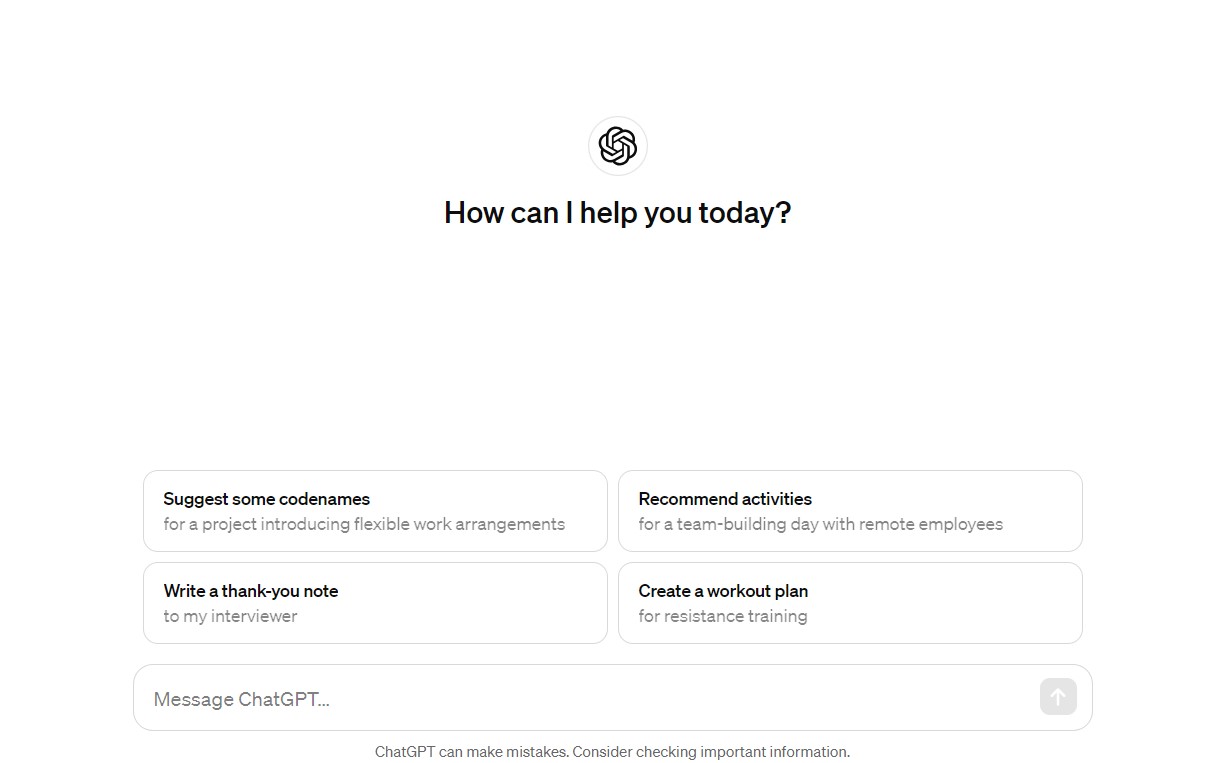
Une fois sur la plateforme ChatGPT, vous trouverez généralement une zone de clavardage où vous pourrez saisir vos questions ou les sujets qui vous intéressent. Appuyez sur Entrée et ChatGPT générera instantanément une réponse écrite.
Étape 2 : Définir votre scénario de RVI
Une fois sur la plateforme ChatGPT, l'étape suivante consiste à identifier le scénario pour lequel vous avez besoin d'un script de RVI. Tenez compte de facteurs tels que votre type d'entreprise, les besoins des clients et le flux d'appels habituel.
Commencez par identifier les raisons les plus courantes pour lesquelles les clients appellent votre entreprise. Cela peut inclure des demandes concernant des produits ou services, des informations sur le compte, la facturation ou le soutien technique.
Que vous soyez un fournisseur de soins de santé, une boutique en ligne ou une institution financière, adaptez le script pour qu'il corresponde aux normes de votre secteur et aux attentes de vos clients.
Étape 3 : Structurer le script
Un script de SVI bien structuré est essentiel pour guider efficacement les appelants dans le système. Divisez le script en sections logiques, telles que :
Message d'accueil : Saluez les appelants et donnez un bref aperçu des services offerts.
Options du menu : Présentez aux appelants une liste d'options parmi lesquelles choisir. Gardez le menu concis et organisé.
Invites de saisie : Demandez les renseignements nécessaires aux appelants, comme les numéros de compte ou les détails de commande.
Confirmation et prochaines étapes : Confirmez les saisies et donnez des instructions pour la suite ou pour le transfert vers un agent en direct.
Étape 4 : Générer le script à l'aide de ChatGPT
Voici maintenant l'étape intéressante. Il est temps de générer le script de SVI à l'aide de ChatGPT.
Commencez par fournir à ChatGPT une consigne claire décrivant votre scénario de SVI et la structure de script souhaitée.
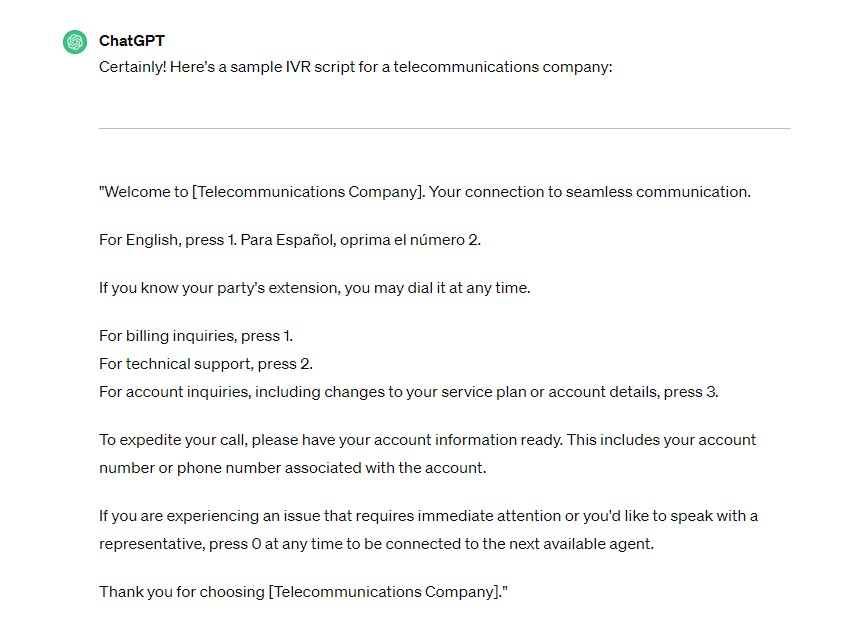
Consigne : « Génère un script de SVI pour une entreprise de télécommunications. Le script doit inclure un message d'accueil, des options de menu pour la facturation, le soutien technique et les demandes relatives au compte, des invites pour les renseignements sur le compte et des instructions pour le transfert vers un agent en direct. »
Pour des scripts de flux d'appels plus simples, essayez d'utiliser des consignes plus courtes et plus précises. Par exemple :
Consigne : « Génère un message de file d'attente pour le temps d'attente estimé. »
Consigne : « Génère un court message d'option de rappel pour le SVI. »
Vous pouvez également demander à ChatGPT de générer une liste d'idées.
Consigne : « Donne-moi des idées de scripts de SVI pour le temps d'attente estimé. »
Étape 5 : Peaufiner et personnaliser
Une fois le script généré, prenez le temps de le réviser et d'apporter les ajustements nécessaires pour assurer la clarté, la cohérence et l'alignement avec l'image de marque.
Les scripts de SVI sont l'occasion de renforcer le ton et les valeurs de votre marque. En personnalisant les scripts, vous vous assurez que chaque interaction correspond à votre identité de marque, ce qui améliore la cohérence à tous les points de contact avec la clientèle.
Dans un marché concurrentiel, des scripts de SVI personnalisés peuvent également aider votre marque à se démarquer.
Étape 6 : Tester et itérer
Avant de déployer le script de SVI, il est important d'effectuer des tests approfondis pour garantir sa fonctionnalité et sa convivialité.
Vous pouvez simuler différents scénarios et saisies d'utilisateurs pour cerner les problèmes potentiels ou les points à améliorer. Assurez-vous de réviser le script de SVI en fonction des commentaires et des résultats des tests pour garantir une performance optimale et une plus grande satisfaction de la clientèle.
Étape 7 : Déployer et surveiller la performance
Une fois que vous êtes satisfait du script de SVI, déployez-le dans votre système de téléphonie et surveillez étroitement sa performance.
Les scripts de RVI ne devraient pas rester statiques. Ajustez votre script au besoin pour améliorer sa performance et vous adapter aux besoins changeants de vos clients. Vous devriez également recueillir les commentaires des appelants et analyser les habitudes d'utilisation pour identifier des occasions d'optimisation.
Meilleures pratiques pour la rédaction de scripts de RVI
En plus de tirer parti de ChatGPT pour la génération de scripts, l'intégration des meilleures pratiques suivantes peut améliorer davantage vos scripts de RVI :
Gardez les options simples et claires : Limitez le nombre d'options présentées aux appelants et assurez-vous que chaque option est clairement articulée. Évitez les menus longs ou les chemins complexes qui peuvent frustrer les appelants et mener au désengagement. Offrez une option pour parler à un humain : Bien que les systèmes de RVI soient conçus pour automatiser les processus, il est important d'offrir aux appelants un moyen de parler à un agent en direct au besoin. Incluez une option pour « parler à un représentant » à tout moment du flux d'appel pour répondre aux problèmes complexes et aux préférences des clients. Personnalisez l'expérience : Dans la mesure du possible, utilisez les données des appelants pour personnaliser l'expérience de RVI. Saluez les appelants par leur nom si leurs informations sont disponibles et adaptez les options en fonction de leurs interactions passées avec votre entreprise. La personnalisation peut améliorer l'engagement et favoriser un sentiment de connexion avec votre marque. Surveillez et analysez la performance : Surveillez régulièrement la performance de votre système de RVI et analysez les données d'appel pour identifier les points à améliorer. Portez attention aux indicateurs clés du centre de contact tels que le taux de complétion des appels, la durée moyenne de traitement et les scores de satisfaction client pour évaluer l'efficacité de vos scripts et effectuer des ajustements fondés sur les données.
Résumé
L'utilisation de ChatGPT pour générer des scripts de RVI simplifie le processus complexe de création de scripts téléphoniques. Grâce à ses capacités d'IA générative, ChatGPT peut aider à créer une vaste gamme d'exemples de scripts de RVI adaptés à diverses entreprises et cas d'utilisation.
En suivant les étapes décrites ci-dessus, vous pouvez utiliser ChatGPT pour développer et peaufiner vos scripts de RVI. Des scripts de RVI bien conçus peuvent aider à améliorer l'expérience client, à rationaliser le flux d'appels au sein de votre centre de contact et à accroître l'efficacité opérationnelle globale de votre entreprise.
Enfin, n'oubliez pas d'adapter les scripts à vos besoins spécifiques, de tester rigoureusement et de mettre à jour régulièrement vos scripts de RVI pour maximiser le succès de votre système téléphonique.
Pour en savoir plus sur les systèmes téléphoniques RVI et sur la façon dont ils peuvent aider votre entreprise, cliquez ici
Abonnez-vous à notre infolettre
Merci de vous être abonné!
Bienvenue dans la communauté de l'infolettre de ComputerTalk. Surveillez votre boîte de réception pour nos mises à jour mensuelles.
Oups! Une erreur est survenue lors de la soumission du formulaire.
%20-%20Google%20Ads.png)