iceAI Studio vous donne un contrôle total sur les connaissances de vos agents IA et sur la façon dont ils dirigent les clients, favorisant ainsi des résolutions plus rapides et de meilleures expériences.
De la norme PCI-DSS à la certification SOC 2, le centre de contact ice est bâti sur un cadre de conformité qui saura satisfaire votre équipe de sécurité
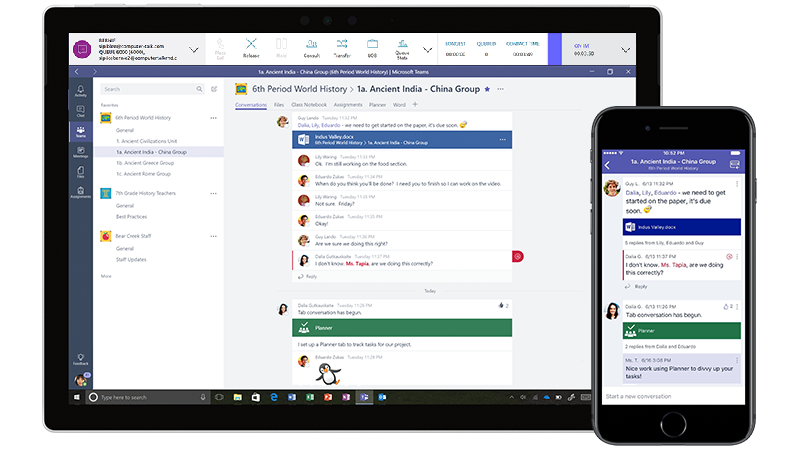
If Microsoft Teams is your organization’s final destination, there are many paths to get there and several resources online that can help guide you through the process. There are factors to consider such as whether or not to use calling plans or direct routing, how and when to migrate Skype for Business users’ meetings, and how to stage upgrades so that users can still collaborate while in different upgrade modes.
Fortunately, ice Contact Center continues to work regardless of the configuration, and makes for a seamless upgrade from on-premises PBX, to Skype for Business Online, to Teams. The reason that ice can continue to function unimpeded through a UC migration is based on two things: the iceBar client and Connection Addresses.
iceBar:
iceBar is the tool that agents use to interact with the contact center. It lets agents log in and out of queues, control their contacts, view the status of the queues, and drive rich screen pop and application integrations.
The contact control features are vital here because agents control their contacts using iceBar rather than the device or application they’re receiving the contact on. This means that the platform used to handle the media ceases to be important. iceBar is not a “softphone” per se, in that it’s not handling any call media. Instead, ice relies on an application or device that agents already have to handle email (your mailbox), IM/Messaging (Teams or Skype for Business), and voice (Teams, Skype for Business, PBX, or PSTN). Configuration for these endpoints is as simple as specifying a connection address for each modality in iceAdministrator.
Connection Address:
A connection address is what tells ice how to reach an agent for various modalities:
For voice calls, this address is anything ice can route to, which can be a federated SIP address on Office 365 (Teams or Skype for Business), a PBX connected through direct routing, or even a mobile phone number. IM contacts (including web chat, Teams, SMS, Facebook, Skype for Business, Skype, and other social media channels) require either Teams or Skype for Business. From an iceBar perspective, all of these clients work the same way-contact control operations are the same regardless of the endpoint. These connection addresses can also be changed by agents or supervisors at any time, so all an agent needs to do is log off and then back on to ice to be reached at the new address. When upgrading an agent from Skype for Business to Teams, there are no configuration changes required on the supervisor’s part. Calls and chats from ice will follow the path designated for calls in the upgrade mode. Once the agent is in Teams Only, this means everything goes to Teams.
Finally, because ice Contact Center handles all of the call media for voice and messaging contacts itself, there is no requirement that all participants in a session are even on the same platform. Consider a case where one agent is on Teams, one is on Skype for Business Online and a caller is coming in over the PSTN. In ice, all three of these parties can be in a multiparty conference through the contact center. This means that groups of agents can pilot Teams without having to migrate the entire contact center overnight.
Of course, once you are on Teams, basic voice and messaging handling is only the start of what a Teams native contact center experience should deliver. Agents in Teams Only mode can take advantage of some unique ice features, such as:
Presence Synchronization: Control your availability in the contact center based on your Teams presence, while still maintaining ice’s extended presence states. This includes automatic states such as being in a direct call and in a meeting, and manual states like Do Not Disturb.
Canned Responses: Automatically insert frequently used responses into Teams chats from iceBar, helping to standardize agents’ chat responses, and free them from typing the same things over and over.
Smart Routing: Combine Microsoft Graph and Smart Routing to help agents collaborate with the entire organization. Front line agents can search the graph for users in Azure Active Directory, and draw them into interactions as needed. These subject matter experts don’t need to run a tool like iceBar, but can still be reported on with the same level of detail as agents.
Actionable Alerts: In iceMonitor, key performance metrics can be tagged to alert directly into a Teams channel, which supervisors can use to collaborate on managing the contact center.
These features are available today, in a proven, enterprise-grade contact center with a fully redundant high availability cloud and proven service levels for mission-critical applications. There are, of course, more great features for ice Contact Center for Teams in the works, so keep an eye on this space for more information later in the year.
Abonnez-vous à notre infolettre
Merci d'avoir communiqué avec ComputerTalk !
Nous prendrons contact avec vous sous peu. Il y a aussi un bouton de discussion maintenant dans le coin inférieur droit du site Web, si vous souhaitez nous parler immédiatement.
Oups! Une erreur est survenue lors de l'envoi du formulaire.
%20-%20Google%20Ads.png)