Call centers can improve their operations and deliver superior customer service with powerful software integrations. These tools make it easier to streamline processes so that customers get the best possible experience from your team.
In today’s fast-paced business environment, call centers play a crucial role in maintaining customer relationships and driving business growth. They are essential for most businesses as they handle many important customer-oriented tasks, such as responding to customer inquiries, collecting payments, and assisting sales teams. To stay competitive and deliver exceptional customer experiences, call centers must leverage the power of software integrations.
There are many software integrations available that help contact centers connect customer data, workforce management tools, collaboration platforms, analytics solutions, and reporting applications. These integrations allow different systems to work together seamlessly, helping organizations streamline operations, improve visibility, and deliver better customer experiences.
Why Software Integrations Matter
Before diving into specific integrations, it’s important to understand why they are important for call center success. Software integrations allow different systems and applications to work together seamlessly, creating a unified ecosystem that enhances efficiency and effectiveness. For call centers this means:
Improved data flow and accessibility
Reduced manual data entry and errors
Enhanced agent productivity and performance
Better customer insights and personalization
Streamlined workflows and processes
While some organizations may begin with a single integration, most modern contact centers rely on multiple connected applications. For example, a contact center may integrate a CRM platform to access customer information, a workforce management solution to optimize staffing, and a reporting platform to measure performance. Together, these integrations create a more connected and efficient technology ecosystem.
Now, let’s explore five different software integrations that can transform your call center operations.
5 Software Integrations for Modern Call Centers
Collaboration and Communication
Customer inquiries often require collaboration beyond the contact center. Collaboration and communication platforms help agents connect with supervisors, subject matter experts, and back-office teams to resolve issues more efficiently and improve customer experiences.
Microsoft Teams
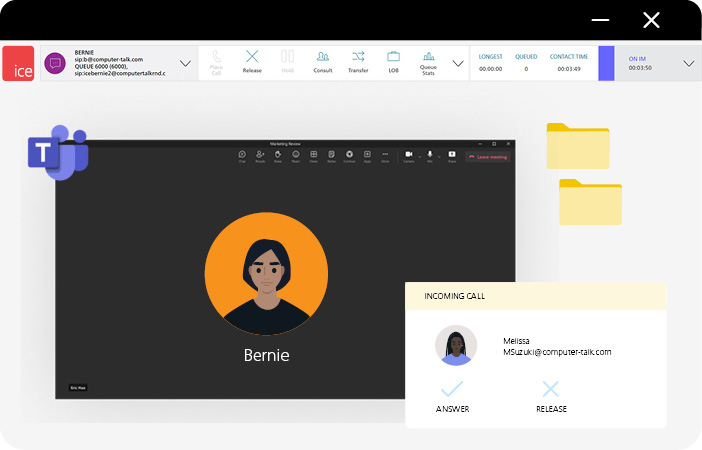
Microsoft Teams is a collaboration and communication platform that brings chat, voice, video, and file sharing into a single workspace. Integrating Microsoft Teams with your call center can help streamline operations, improve agent productivity, and enhance the overall customer experience by making it easier to collaborate across the organization.
Benefits of Microsoft Teams:
Improve communication across departments: Enable customer service teams and business users to collaborate through a shared communications platform. Bringing conversations into a single environment can improve visibility, coordination, and information sharing across the organization.
Extend customer service beyond the contact center: Allow employees outside the contact center to participate in customer interactions when specialized knowledge is required. This helps organizations leverage expertise across the business to provide more informed and effective customer support.
Minimize disruptions caused by disconnected communication tools: Bring chat, meetings, voice communications, and collaboration tools into a single platform. Reducing the need to switch between multiple applications helps employees stay focused and work more efficiently throughout the day.
Zoom
Zoom is a communications platform that provides video meetings, phone capabilities, messaging, and collaboration tools for distributed workforces. When integrated with a contact center, Zoom helps connect employees across locations and departments while supporting day-to-day customer service operations.
Benefits of Zoom:
Support consistent collaboration across remote and hybrid teams: Provide agents, supervisors, and support teams with a centralized communications platform regardless of location. This helps maintain collaboration and service continuity across remote and hybrid work environments.
Improve escalation management: Bring the right people together quickly when customer inquiries require additional expertise or management involvement. Faster coordination can help shorten resolution times and improve customer experience.
Reduce communication silos: Centralize meetings, messaging, and voice communications within a single platform, helping departments stay aligned when supporting customers.
Slack
Slack is a workplace messaging platform designed to connect employees, teams, and applications through real-time communication. Integrating Slack with your contact center means your employees can leverage a tool they already use every day, making it easier for agents to access internal expertise, share knowledge, and coordinate issue resolution across departments.
Benefits of Slack:
Accelerate internal communication: Enable agents to quickly connect with internal teams and stakeholders through real-time messaging rather than relying on lengthy email chains or delayed responses.
Put organizational knowledge at agents’ fingertips: Centralize conversations, documents, and resources in a searchable workspace, helping employees locate answers faster when supporting customers.
Streamline cross-functional collaboration: Make it easier for customer service, operations, IT, and business teams to work together when resolving customer issues or supporting internal processes.
Customer Relationship Management Integrations
Customer Relationship Management (CRM) helps contact centers centralize customer information, service records, and interaction history. These solutions provide agents with access to the data they need to deliver more personalized customer experiences while reducing manual processes and improving operational visibility.
Dynamics 365
Dynamics 365 is Microsoft’s customer relationship management platform, designed to help organizations manage customer information, service operations, and business processes. Integrating Dynamics 365 with your contact center gives agents access to valuable customer context throughout every interaction.
Benefits of Dynamics 365:
Deliver more personalized customer experiences: Provide agents with visibility into customer history, preferences, previous interactions, and service records. Having this context available helps agents better understand customer needs and tailor conversations accordingly.
Reduce the effort required to manage customer records: Automatically populate and update customer information during interactions, reducing manual administrative work and helping agents spend more time assisting customers.
Give agents faster access to customer information: Centralize customer records within a single platform so agents can quickly access account details, service history, and previous interactions without searching multiple systems.
Salesforce
Salesforce is a CRM platform that helps organizations manage customer relationships, support cases, customer information, and service operations. When integrated with your contact center, Salesforce provides agents with a more complete view of the customer journey.
Benefits of Salesforce:
Create a single source of truth for customer information: Bring customer records, interaction history, case information, and service data into one centralized platform, helping agents access the information they need more efficiently.
Deliver consistent customer experiences: Ensure customer information is available regardless, or how customers choose to engage, helping organizations provide more consistent service experiences.
Reduce manual work through automation: Automate case creation, follow-up tasks, and workflow activities to help agents focus on customer interactions rather than administrative processes.
ServiceNow
ServiceNow is a cloud-based software that provides digital workflow solutions for enterprise operations. Integrating ServiceNow with your contact center helps your organization manage customer requests more efficiently by connecting agents with the processes, workflows, and information they need to resolve issues.
Benefits of ServiceNow:
Improve visibility across service operations: Provide employees with easier access to customer requests, service history, and case information, helping teams collaborate more effectively when supporting customers.
Reduce delays caused by manual workflows: Automate tasks such as ticket routing, case management, and service requests to improve response times and operational efficiency.
Create a connected service experience: Provide agents and service teams with access to customer information, service requests, case history, and workflow updates from a centralized platform, making it easier to track and resolve issues.
Workforce Management Integrations
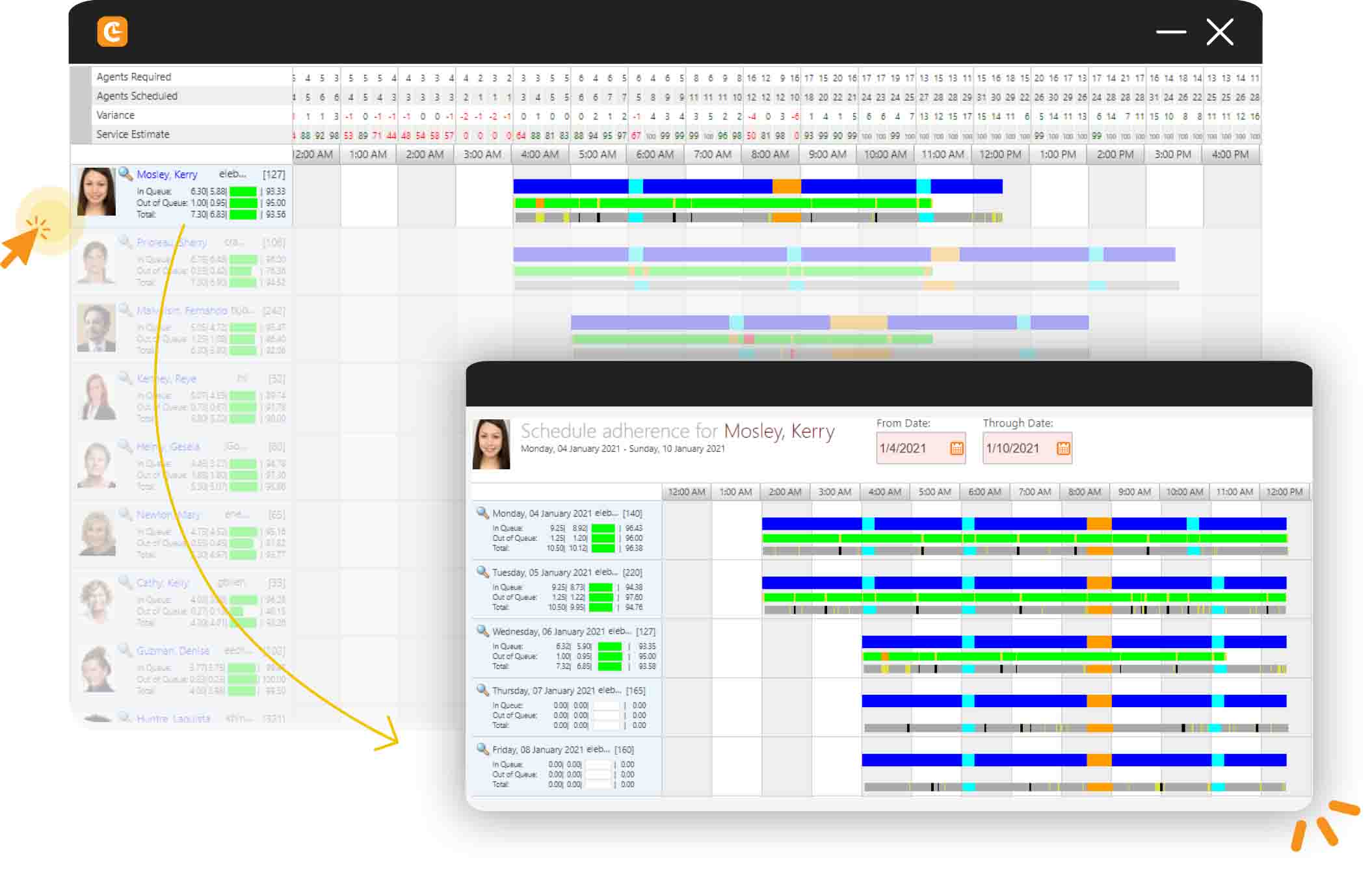
Workforce Management (WFM) integrations help contact centers forecast customer demand, optimize staffing levels, create employee schedules, and monitor adherence. These solutions help organizations balance operational efficiency with customer service objectives by ensuring the right resources are available at the right time.
CommunityWFM
Community is a WFM solution designed specifically for call centers. It offers a simplified approach to workforce management, focused on improving forecasting, scheduling, and overall operational efficiency.
Benefits of CommunityWFM:
Align staffing levels with customer demand: Forecast interaction volumes and staffing requirements more accurately, so the right resources are available when customers need support.
Improve service levels without overstaffing: Build schedules based on expected demand and service objectives, helping organizations balance customer expectations with operational efficiency.
Gain greater visibility into workforce performance: Monitor adherence, scheduling trends, and workforce utilization through reporting tools that support better staffing decisions.
Calabrio
Calabrio is a workforce management and workforce engagement platform that helps organizations optimize scheduling, forecasting, and workforce performance. Like other WFM solutions, Calabrio helps contact centers align staffing resources with customer demand. It also offers additional workforce engagement capabilities designed to support employee satisfaction, schedule flexibility, and performance management. When integrated with your contact center, Calabrio helps ensure workforce resources are aligned with operational goals and customer demand.
Benefits of Calabrio:
Make staffing decisions with greater confidence: Use forecasting tools and historical data to better predict customer demand and staffing requirements.
Optimize schedules based on operational needs: Ensure staffing resources are aligned with customer demand, skill requirements, and service goals.
Improve workforce engagement and flexibility: Provide employees with greater flexibility into schedules and self-service capabilities that support workforce satisfaction and schedule management.
Reporting & Data Visualization Integrations
Reporting and data visualization integrations help organizations transform operational data into actionable insights. By consolidating information from contact center platforms, CRM systems, workforce management solutions, and other business applications, reporting tools provide greater visibility into performance metrics and business outcomes.
Microsoft Power BI
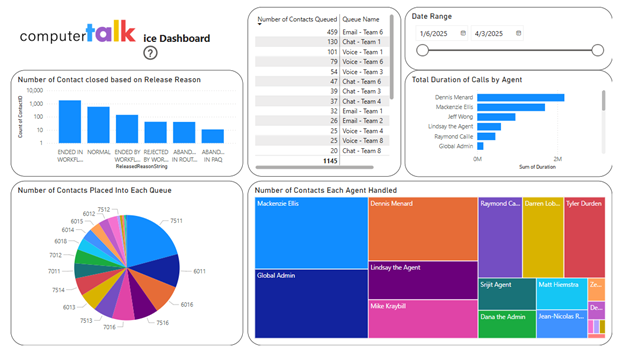
Microsoft Power BI is a reporting and data visualization platform that transforms data from multiple sources into interactive reports and dashboards. Integrating Power BI with your contact center helps your organization gain deeper visibility into overall operational performance.
Benefits of Power BI:
Identify trends and opportunities for improvement: Transform contact center data into visual reports that help uncover performance trends, service challenges, and opportunities to improve customer service operations.
Eliminate repetitive reporting tasks: Reduce the need to repeatedly manipulate and consolidate contact center data by creating reports that automatically refresh and present the information most relevant to you.
Create a more complete picture of business performance: Combine contact center, CRM, or other business data into a single reporting environment to better understand how operational activities impact overall business outcomes.
Tableau
Tableau is a data visualization and analytics platform that helps organizations transform complex data into easy-to-understand visual reports and dashboards. When integrated with your call center, Tableau helps you analyze performance data and uncover actionable business insights.
Benefits of Tableau:
Turn large volumes of data into actionable insights: Help business users identify trends, patterns, and opportunities that may otherwise be difficult to uncover through traditional reporting methods.
Improve visibility across the organization: Provide leaders and stakeholders with a clear view of operational performance through interactive dashboards and visual reports.
Spot issues before they become bigger problems: Use interactive dashboards to uncover operational challenges early, helping teams take corrective action before they have a larger impact on service levels.
Speech analytics and conversation intelligence platforms help contact centers analyze customer conversations to uncover trends, understand customer sentiment, identify coaching opportunities, and improve service quality. These solutions transform large volumes of customer interactions into actionable business insights that support both customer experience and operational improvement.
Tethr
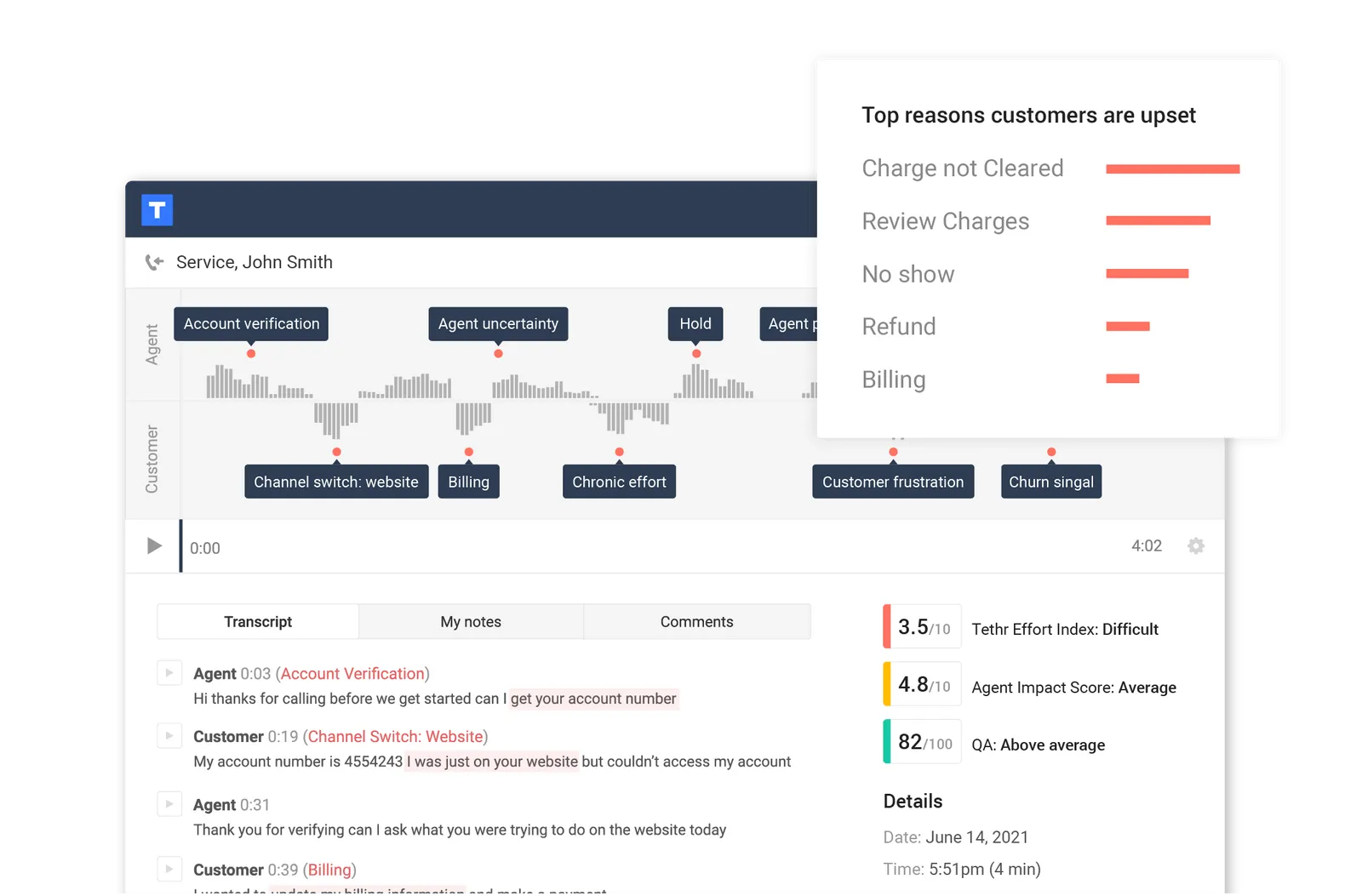
Tethr is a conversion intelligence platform that uses artificial intelligence (AI) and speech analytics to analyze customer interactions across various channels, including phone calls, chats, and emails. This integration helps businesses gain insights from customer conversations to improve customer experience, sales performance, and operational efficiency.
Benefits of Tethr:
Understand why customers are contacting your organization: Analyze customer interactions to identify recurring issues, common pain points, and topics that are driving customer contact volume.
Expand quality assurance coverage beyond manual reviews: Evaluate more interactions than traditional quality assurance programs, providing a broader understanding of customer experience and agent performance.
Turn customer conversations into coaching opportunities: Use conversation insights to identify performance trends, reinforce best practices, and support ongoing agent development initiatives.
CallMiner
CallMiner is a conversation intelligence and speech analytics platform that helps organizations analyze customer interactions, customer sentiment, and operational performance. Integrating CallMiner with your call center can help your organization analyze large volumes of customer conversations to better understand customer behavior and uncover opportunities for improvement.
Benefits of CallMiner:
Gain deeper visibility into customer sentiment: Identify trends in customer satisfaction, frustration, and overall sentiment by analyzing large volumes of customer conversations.
Strengthen quality and compliance initiatives: Automatically identify interactions that may require additional review, helping organizations support quality management and compliance programs.
Uncover opportunities to improve operations: Use conversation analytics to identify recurring issues, process inefficiencies, and customer experience challenges that may impact operational performance.
How to Choose the Right Integration Strategy for Your Contact Center
Not every contact center requires the same combination of software integrations. The right integration strategy will depend on your business objectives, technology environment, operational challenges, and long-term goals.
Evaluate Your Current Challenges
Begin by identifying the operational challenges you are trying to solve. For example, organizations struggling with disconnected customer information may benefit from a CRM integration, while contact centers experiencing staffing and scheduling challenges may benefit from a workforce management solution.
Review Your Existing Technology Stack
The most effective integrations are those that complement your existing systems and workflows. Evaluate how customer information, reporting, collaboration, and workforce data are managed today and identify areas where integrations can help improve efficiency.
Consider Future Business Requirements
As customer expectations continue to evolve, many organizations are investing in analytics, automation, and AI-powered technologies. Selecting flexible integration solutions can help support future growth and changing operational needs.
Think Beyond a Single Integration
Most modern contact centers rely on multiple integrations rather than a single solution. For example, an organization may use Dynamics 365 to manage customer information, Microsoft Teams to support collaboration, and PowerBI for reporting and analytics.
Software Integration Best Practices for Contact Centers
Implementing software integrations is only the first step. Following these best practices can help organizations maximize adoption, improve performance, and realize greater value from their technology investments.
Focus on user adoption: Even the best integration can fail if employees don’t understand how to use it effectively. Training, documentation, and ongoing support can help drive adoption across the organization.
Prioritize data accuracy: Integrations are only as valuable as the data they share. Establish clear processes for managing customer, workforce, and operational data to ensure consistency across connected systems.
Automate where it makes sense: Look for opportunities to eliminate manual tasks such as duplicate data entry, workflow routing, reporting updates, and case management activities. Automation can help improve efficiency while reducing the risk of errors.
Measure performance regularly: Track key indicators such as service levels, customer satisfaction, average handle time, adherence, and agent productivity to understand how organizations are impacting performance.
Continuously optimize: Business requirements change over time. Regularly reviewing integrations, processes, and reporting can help ensure your technology ecosystem continues to align with your organizational goals.
Building a More Connected Contact Center
Modern contact centers often integrate additional business applications alongside their contact center platform. While many contact center solutions include native capabilities such as reporting, analytics, and AI-powered functionality, organizations frequently integrate their CRM platforms, WFM solutions, or other applications to support operational requirements and leverage existing technology investments.
Whether you’re looking to centralize customer data, improve workforce planning, strengthen collaboration, or gain deeper operational insights, selecting the right software integrations can help create a more connected and efficient contact center.
Whether you’re looking to centralize customer data, improve operational efficiency, or create a more connected technology ecosystem, CRM integrations are often a key part of the equation. Learn more in our guide: Contact Center CRM Integrations: A Complete Guide.
Subscribe to our newsletter
Thank you for subscribing!
Welcome to the ComputerTalk Newsletter community. Keep a lookout for our monthly updates in your inbox.
Oops! Something went wrong while submitting the form.
%20-%20Google%20Ads.png)